16 · Factuzam and Contazam: an integrated workflow
Factuzam manages commercial activity, while Contazam turns that activity into reviewable accounting, banking and tax information. This chapter explains what each application provides, how data passes from one to the other and which checks users must perform before posting or submitting information.
Screenshot language: in the languages published by Factuzam, the in-app interface is fully translated into the selected language. To provide one consistent visual reference, screenshots in this manual are shown in Spanish; the explanatory text is localised. This notice applies to Factuzam. Contazam is documented using its current Spanish interface, and its complete translation remains planned.
The screenshots in this chapter use fictitious test data. They contain no credentials, real tax information or customers' bank details.
A workflow with separate responsibilities
The two applications complement one another, but they do not perform the same work:
| Application | Main responsibility | Examples |
|---|---|---|
| Factuzam | Commercial operations and source documentation. | Items and SKUs, purchasing, wholesale, POS, warehouses, stocktakes, photographs, commercial collections and payments, PrestaShop and VeriFactu. |
| Contazam | Accounting review, cash management, taxation and closing reports. | Chart of accounts, Journal and General Ledger, imports from Factuzam, banking, reconciliation, due dates, VAT, tax forms, depreciation, management accounting, audit and annual accounts. |
The connection is designed so that Contazam reads Factuzam without changing it. An invoice, effect or third party is previewed before import. When an operation generates a journal entry, it remains a draft awaiting human review. This separates the original commercial data from the final accounting decision.
From Factuzam to Contazam
1. Preparing the company, financial year and third parties
In Contazam, select the company and accounting year. Customers and suppliers can be synchronised from Factuzam or created manually. Manually created records retain a stable code and their customer or supplier subaccounts, with controls to prevent two users from overwriting the same data.
Before importing documents, check the sales, purchase, VAT, withholding, bank and collection or payment accounts and methods that each operation will use.
2. Previewing invoices and effects
Contazam can perform read-only enquiries on:
- sales and purchase invoices, including the sales PDF when available;
- effects, commercial collections and payments;
- the customers and suppliers required to complete the operation.
The preview identifies valid rows, warnings and errors before creating anything. The import can be repeated without duplicating an invoice that has already been incorporated, and it retains the link to its source for subsequent tracking.
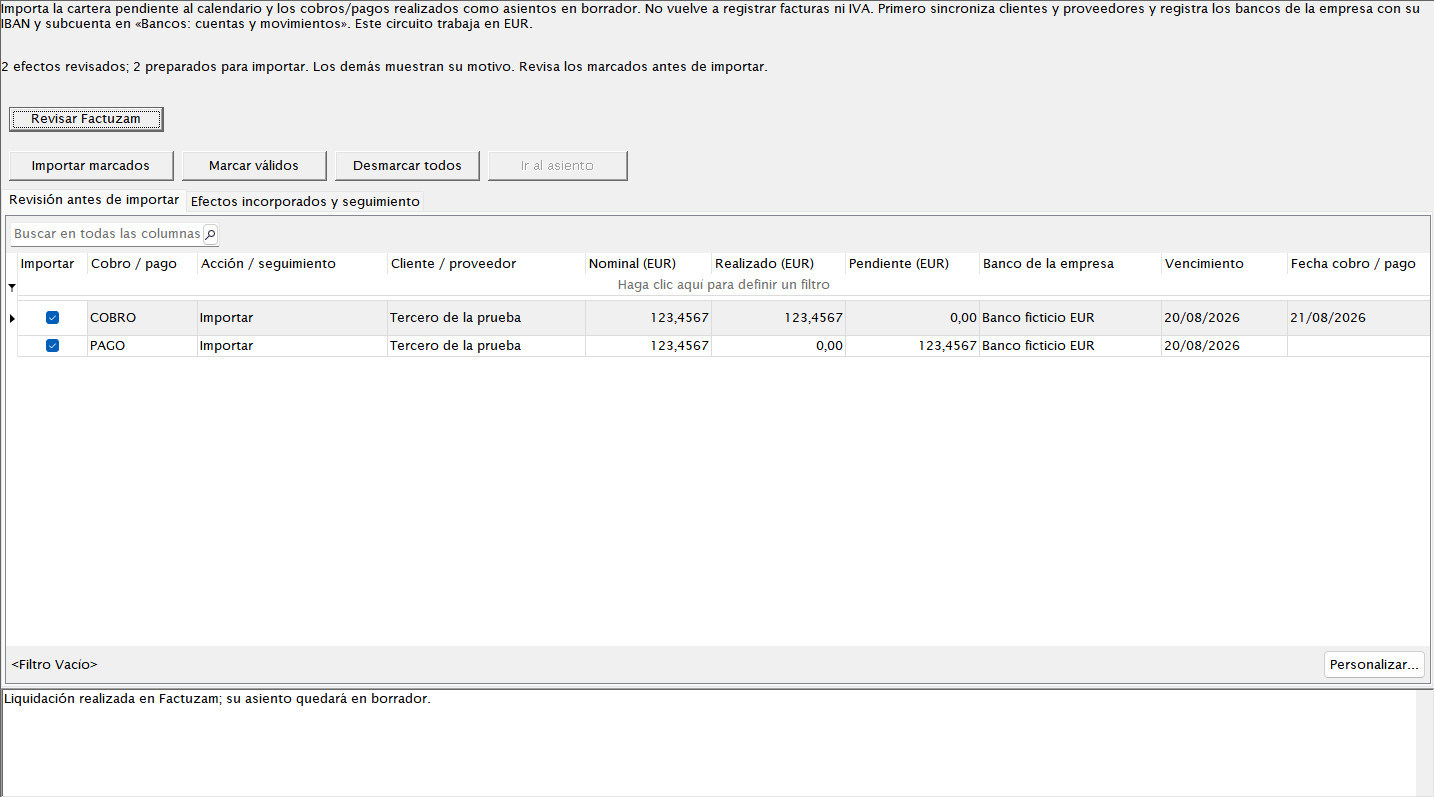 Effects are reviewed before import; the resulting journal entries remain in
draft and Factuzam is not changed.
Effects are reviewed before import; the resulting journal entries remain in
draft and Factuzam is not changed.
3. Reviewing, completing and posting
After importing:
- open the document or draft journal entry;
- check the date, third party, accounts, taxable amount, VAT, withholding, due dates and description;
- resolve warnings and attach or check the archived PDF;
- post only when the entry balances and the supporting documentation is sufficient.
Contazam's document archive retains PDFs, thumbnails and tracking references so that supporting documents can be found from within the accounting workflow.
Collections, payments and banking
Importing bank transactions
Under Contazam ▸ Cobros, pagos y bancos ▸ Bancos, create the company's bank accounts and import statements in CSV, XLSX or Norma 43 format.
The screen can preview columns, save mapping profiles and validate the date, description, amount and balance. Contazam retains the original file and its SHA-256 fingerprint, and flags possible duplicates before accepting the lines.
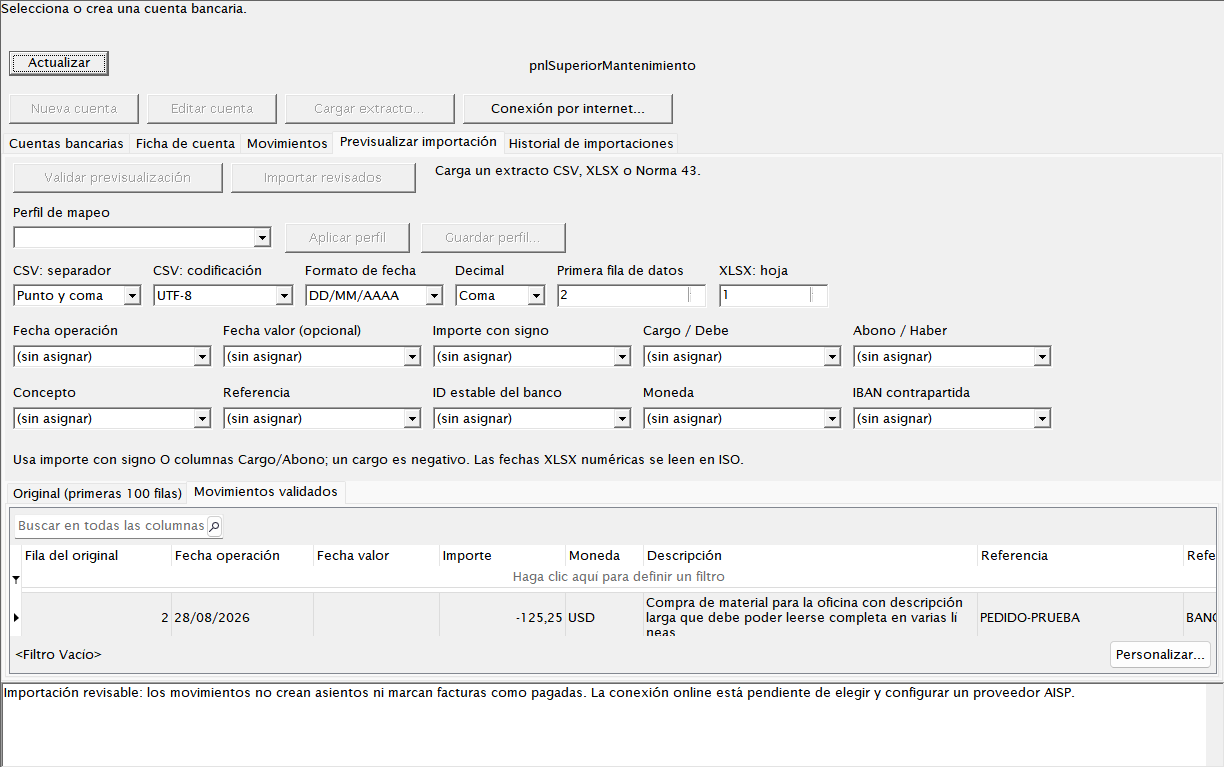 The preview allows the mapping to be corrected before the statement is
imported.
The preview allows the mapping to be corrected before the statement is
imported.
This function imports files. There is no online banking connection or automatic download from the bank.
Reconciling without losing traceability
Under Cobros, pagos y bancos ▸ Conciliación bancaria, one or more statement transactions can be related to one or more effects, invoices, due dates or postings. Reconciliation is local, reviewable and reversible; it does not send collection or payment instructions to the bank.
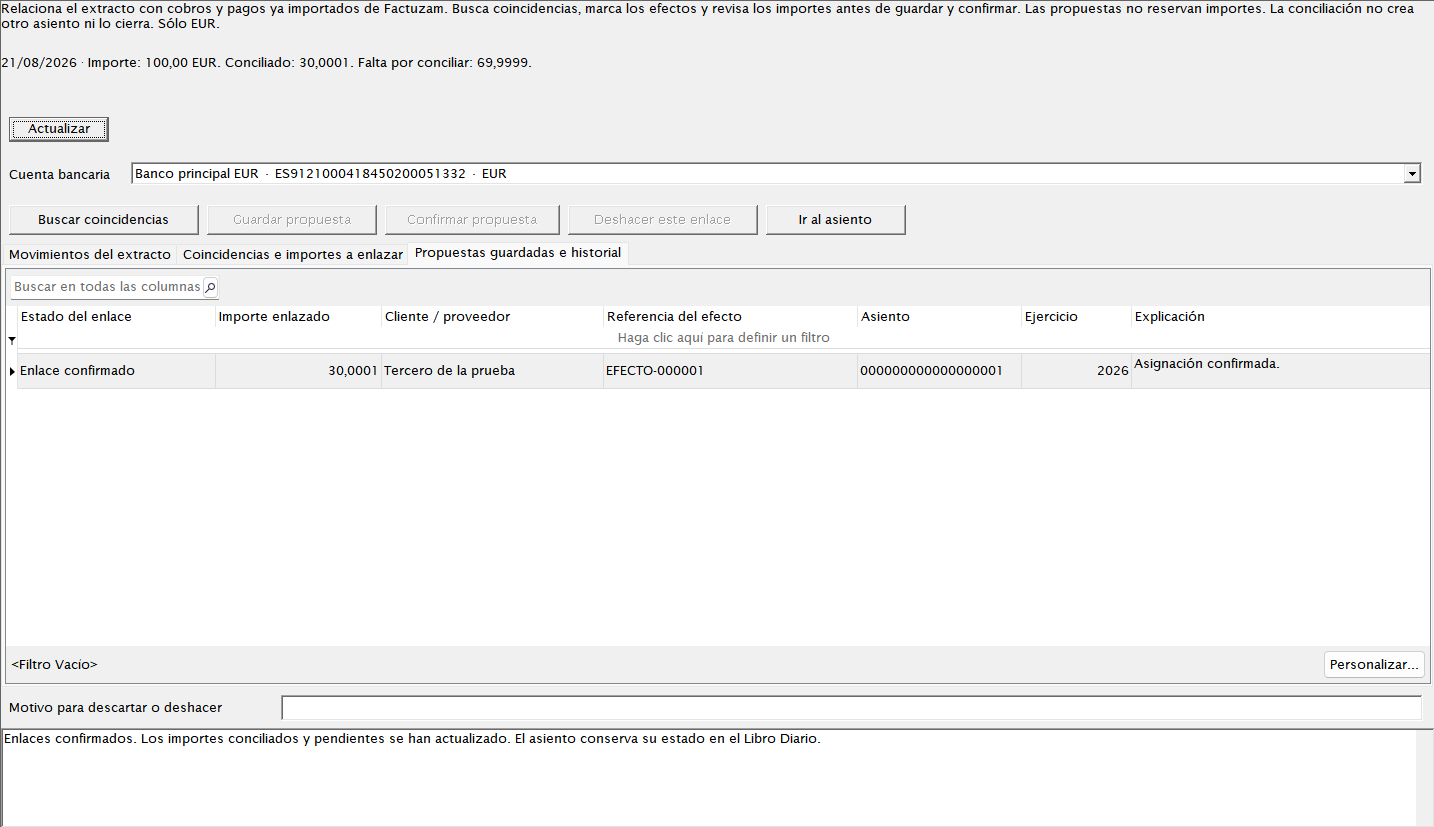 A partial reconciliation retains the applied amount, outstanding difference
and related documents.
A partial reconciliation retains the applied amount, outstanding difference
and related documents.
Debt ageing and cash management
The path Contazam ▸ Cobros, pagos y bancos ▸ Antigüedad de deuda: cobros y pagos groups balances into ageing bands. From there, users can analyse customers and suppliers, overdue and upcoming due dates, partial collections or payments and daily, weekly or monthly forecasts.
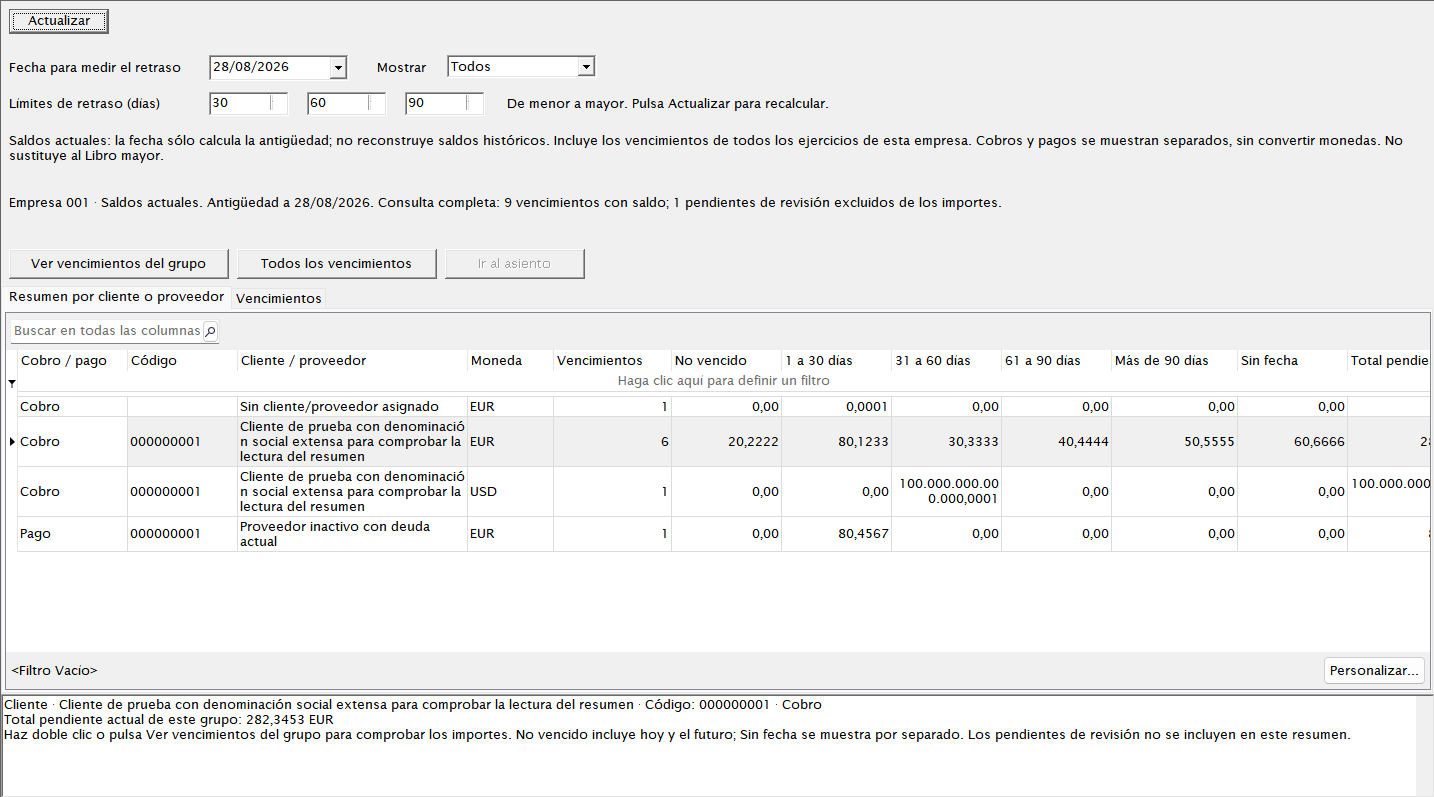 The bands help prioritise debt management and open the details that make up
each balance.
The bands help prioritise debt management and open the details that make up
each balance.
Cash-management warnings help identify overdue items, differences and documents that have not been reconciled with the General Ledger. They support the review process but do not replace checking the bank statement and accounting account.
Reviewable taxation
Under Contazam ▸ Impuestos, users can prepare VAT ledgers, a draft Form 303, Form 349, Forms 111/115 withholding, Form 347 transactions, Forms 190/180 summaries and annual Form 390 data. The screens display issues and allow users to return to the posting or third party that produced each amount.
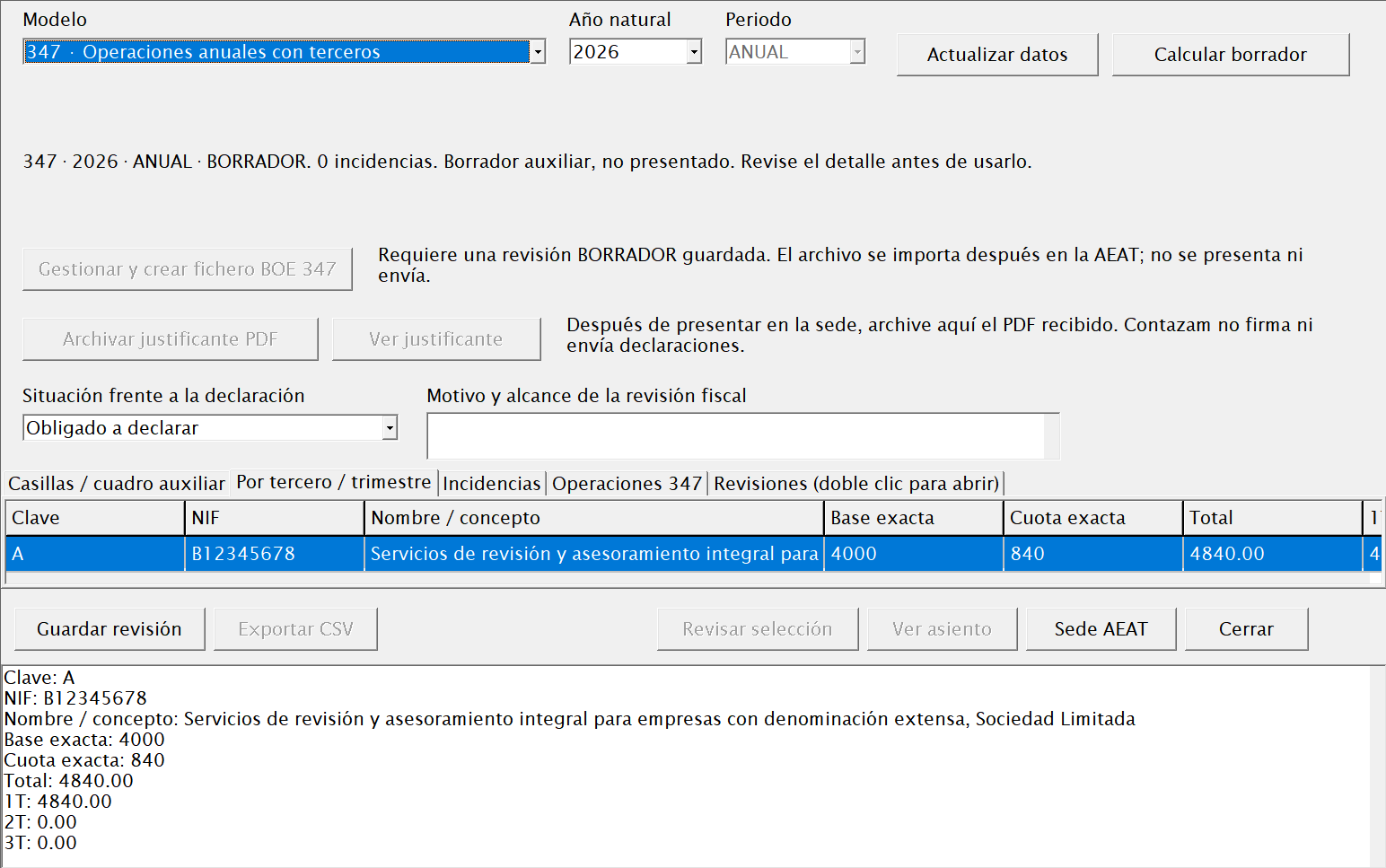 Tax preparation displays totals and issues before generating a reviewable
file.
Tax preparation displays totals and issues before generating a reviewable
file.
Contazam does not sign or file tax returns. It generates drafts and, for enabled forms, official files that users must review and upload through the appropriate channel. The official Form 390 file is enabled for 2025; 2026 remains locked until its current format has been validated.
Advanced accounting and closing
In addition to the Journal, General Ledger, balances and locked periods, Contazam provides:
- Investment assets and depreciation: asset records, schedules, depreciation charges, disposals or sales and their relationship with VAT.
- Management accounting and budgets: cost centres, departments, projects, works and activities, allocation rules and budget-to-actual comparisons.
- History and audit: an append-only log linked using SHA-256 to detect alterations and reconstruct the sequence of changes.
- Books and annual accounts: case files, snapshots, PDF/XLSX and internal packages for reviewing the close and preparing legalisation.
The D2 package generated by Contazam is an internal draft that cannot be filed. It must be validated using the official tools and requirements before any filing or legalisation.
Limits and checks that must not be omitted
- Factuzam is the commercial source and is never changed from Contazam.
- Imports prevent known duplicates but do not replace the review of accounts, taxes, dates and documents.
- Journal entries generated from invoices or effects are created as drafts and require human approval.
- Bank reconciliation sends no instructions to the bank and can be undone.
- Tax forms must be reviewed; Contazam does not sign or file them.
- Files limited to one financial year or marked as drafts must not be used beyond their stated scope.
- Visible options depend on the company, financial year, permissions and installed migrations.
Quick Contazam map
| Area | Main capabilities |
|---|---|
| Datos básicos | Companies, financial years, chart of accounts, customers and suppliers, counters. |
| Contabilidad | Journal, recurring entries, General Ledger, assets and depreciation, management accounting and budgets. |
| Cobros, pagos y bancos | Debt ageing, banks, Factuzam effects, reconciliation and due-date calendar. |
| Documentos e importaciones | PDF archive, Factuzam sales/purchase invoices and tracking. |
| Impuestos | VAT/303, 349, withholding, 347, 190/180 and 390 within its enabled financial year. |
| Informes y cierre | Balances, Journal, General Ledger, audit, financial statements, annual accounts, legalisation, locking and closing/opening. |